How to self-host rybbit properly
"This website is being recorded for quality assurance purposes"
See the live analytics data from this website
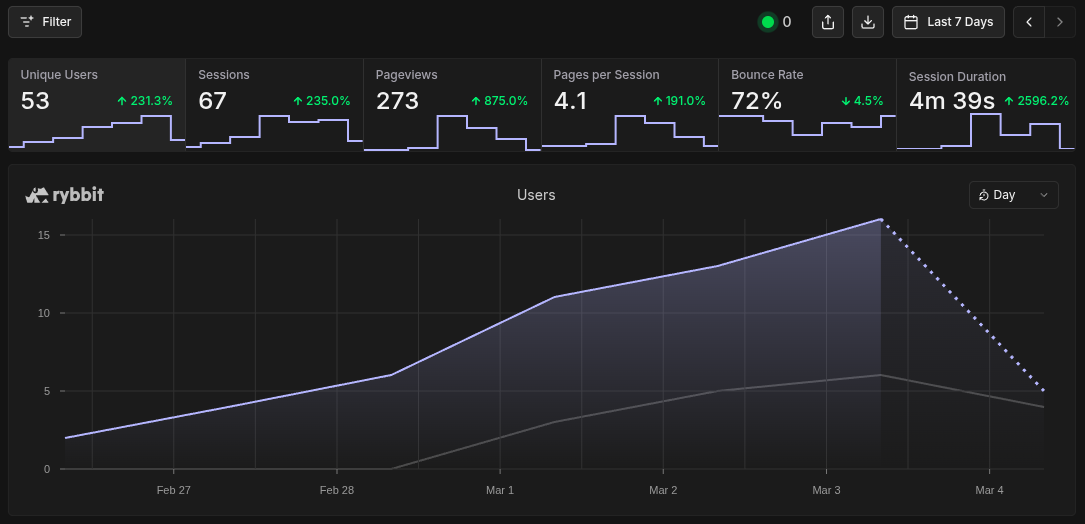
Rybbit.io is a privacy respecting website analysis platform that is free and open source to anyone willing to run it on their platform.
At the moment, self hosting it gives you almost everything that the $13 a month tier does with the exception of the email related items (price list can be found here).
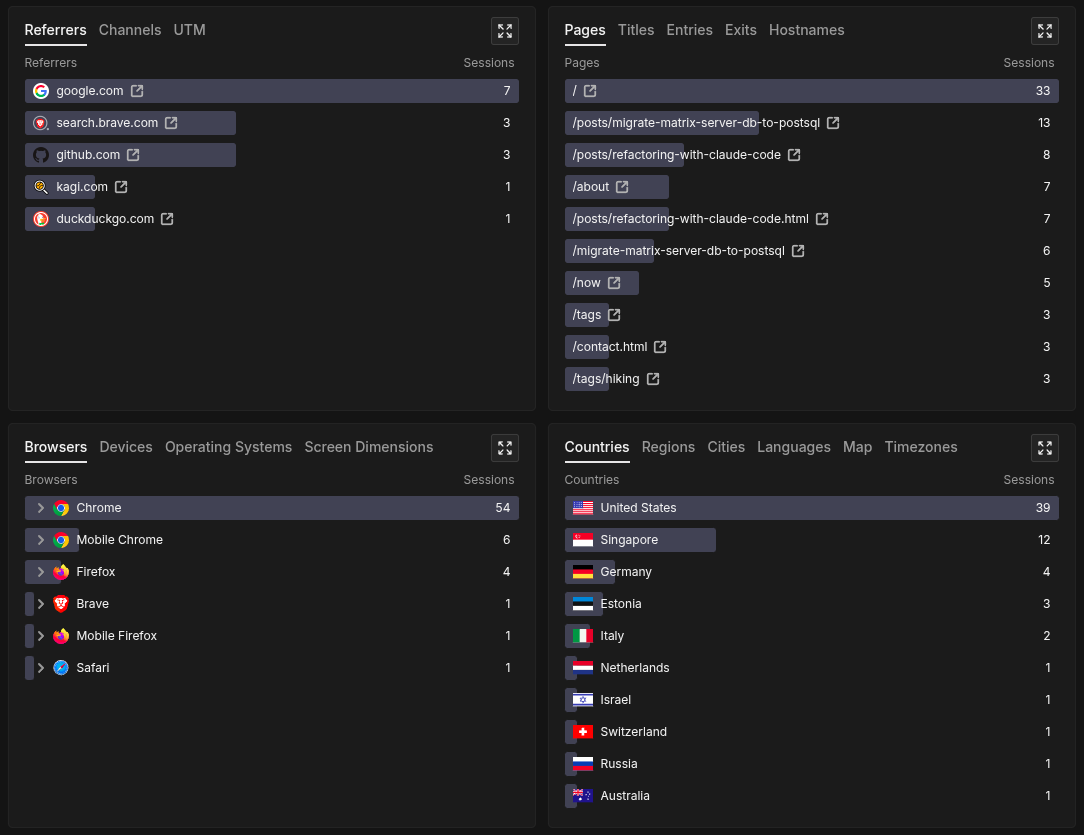
It's exceptionally easy to get up and running, with a very intuitive and insightful display of information regarding how real users are interacting with your website. Since implementing rybbit on this site last week, I've seen traffic from 53 unique users from 11 different countries.
Details you don't want to miss
As I said above, it is exceptionally easy to get it up and running on your own machine by following the docs on the rybbit site.
This however, is a bit of a problem.
There are blatant security issues present in the ./setup.sh code that need to be addressed before making your Rybbit instance public.
When running the ./setup.sh, it automatically builds a minimal .env for you based on your user input.
There are various arguments for the script which can help getting set up faster, but they don't solve the many core issues in the script itself.
When peeking at the .env and docker-compose.yml files that get built as part of the script, a few things should immediately jump out at you as an issue.
orion@intrepid:~/rybbit$ cat .env
# Required variables configured by setup.sh
DOMAIN_NAME=my-website.local
BASE_URL=https://my-website.local
BETTER_AUTH_SECRET=$(my_auto_generated_auth_secret)
DISABLE_SIGNUP=false
orion@intrepid:~/projects/rybbit$ cat docker-compose.yml

# this file has been truncated for brevity
# only the entries relevant to my point remain

  clickhouse:
    environment:
      - CLICKHOUSE_DB=${CLICKHOUSE_DB:-analytics}
      - CLICKHOUSE_USER=${CLICKHOUSE_USER:-default}
      - CLICKHOUSE_PASSWORD=${CLICKHOUSE_PASSWORD:-frog}
    ports:
      - "8123:8123"

  postgres:
    environment:
      - POSTGRES_USER=${POSTGRES_USER:-frog}
      - POSTGRES_PASSWORD=${POSTGRES_PASSWORD:-frog}
      - POSTGRES_DB=${POSTGRES_DB:-analytics}
    ports:
      - "5432:5432"
Right off the bat, you should see two problems.
First, there are no CLICKHOUSE_PASSWORD or POSTGRES_PASSWORD fields in the .env, which means they are using the default values default:frog and frog:frog respectively.
Additionally, in case you didn't know, docker bypasses ufw firewall rules and the ports in the default configuration aren't bound to localhost.
The combination of these two things essentially means that without any additional configuration, your databases are exposed to the internet using the default credentials found in the github repo.
To prove this hunch, I spun up a default rybbit instance on another machine on my home network only using the commands found in the self-hosting guide on the rybbit docs.
After it was up, I ran a quick nmap command from another machine to verify that those ports were indeed open for external use:
orion@theseus:~/projects/rybbit$ nmap -p 8123,5432 intrepid.lan
Starting Nmap 7.95 ( https://nmap.org ) at 2026-03-05 07:35 PST
Nmap scan report for intrepid.lan (192.168.1.156)
Host is up (0.0047s latency).

PORT     STATE SERVICE
5432/tcp open  postgresql
8123/tcp open  polipo

Nmap done: 1 IP address (1 host up) scanned in 0.10 seconds
Using the default credentials stated earlier, I was easily able to get unrestricted access to both databases.
orion@theseus:~/projects/rybbit$ psql -h intrepid.lan -U frog -d analytics
Password for user frog:
psql (17.8 (Debian 17.8-0+deb13u1), server 17.4 (Debian 17.4-1.pgdg120+2))
Type "help" for help.

analytics=# \echo "I've been pwned!"
"I've been pwned!"
orion@theseus:~/projects/rybbit$ curl -u default:frog 'http://intrepid.lan:8123/?query=SHOW+TABLES+FROM+analytics'
events
monitor_events
session_replay_events
session_replay_metadata
Don't worry, this is an easy fix.
Rather than using ./setup, update your .env to include the following:
# ClickHouse Database Configuration
CLICKHOUSE_USER=CHANGE_ME
CLICKHOUSE_PASSWORD=CHANGE_ME

# PostgreSQL Database Configuration
POSTGRES_USER=CHANGE_ME
POSTGRES_PASSWORD=CHANGE_ME
Then update the ports entries in docker-compose.yml such that they are bound to localhost (127.0.0.1):
  clickhouse:
    ports:
      - "127.0.0.1:8123:8123"

  postgres:
    ports:
      - "127.0.0.1:5432:5432"
Start up your docker instance via docker compose up -d, and verify that the ports specified aren't accessible externally:
orion@theseus:~/projects/rybbit$ nmap -p 8123,5432 intrepid.lan
Starting Nmap 7.95 ( https://nmap.org ) at 2026-03-05 08:12 PST
Nmap scan report for intrepid.lan (192.168.1.156)
Host is up (0.0082s latency).

PORT     STATE    SERVICE
5432/tcp filtered postgresql
8123/tcp filtered polipo

Nmap done: 1 IP address (1 host up) scanned in 1.27 seconds
Updating the username and password alongside the port binding can probably be seen as a belt-and-suspenders approach to solving this issue, but there really is no harm in updating an .env file on your machine.
Additional nginx setup
If you're like me and using nginx, you'll need some additional configuration to get rybbit working properly and securely on your site. There is a rybbit doc that covers this, but I've included my own config below which adds additional security.
First thing, you'll need to get an SSL certificate for the domain. If you're running rybbit as a subdomain like I am, you can use the following command:
sudo certbot --nginx -d rybbit.$(your_domain)
Once your SSL cert is complete, add the following to your existing website entry in /etc/nginx/sites-enabled/$(your_domain):
server {
    listen 80;
    listen [::]:80;
    server_name rybbit.$(your_domain);
    return 301 https://$host$request_uri; # This forces https connections
}

server {
    listen 443 ssl;
    listen [::]:443 ssl;
    server_name rybbit.$(your_domain);

    # SSL configuration (using Let's Encrypt)
    ssl_certificate /etc/letsencrypt/live/rybbit.$(your_domain)/fullchain.pem;
    ssl_certificate_key /etc/letsencrypt/live/rybbit.$(your_domain)/privkey.pem;
    include /etc/letsencrypt/options-ssl-nginx.conf;
    ssl_dhparam /etc/letsencrypt/ssl-dhparams.pem;

    # Security headers
    add_header X-Frame-Options "SAMEORIGIN" always;
    add_header X-Content-Type-Options "nosniff" always;
    add_header X-XSS-Protection "1; mode=block" always;

    # API requests
    location /api/ {
        proxy_pass http://localhost:3001;
        proxy_set_header Host $host;
        proxy_set_header X-Real-IP $remote_addr;
        proxy_set_header X-Forwarded-For $proxy_add_x_forwarded_for;
        proxy_set_header X-Forwarded-Proto $scheme;
        proxy_set_header X-Forwarded-Host $server_name;

        # Timeouts
        proxy_connect_timeout 60s;
        proxy_send_timeout 60s;
        proxy_read_timeout 60s;
    }

    # Client app
    location / {
        proxy_pass http://localhost:3002;
        proxy_set_header Host $host;
        proxy_set_header X-Real-IP $remote_addr;
        proxy_set_header X-Forwarded-For $proxy_add_x_forwarded_for;
        proxy_set_header X-Forwarded-Proto $scheme;
        proxy_set_header X-Forwarded-Host $server_name;

        # Timeouts
        proxy_connect_timeout 60s;
        proxy_send_timeout 60s;
        proxy_read_timeout 60s;
    }
}
Login for the first time
Once everything is up, go to the signup page found at rybbit.$(your_domain)/signup and make an admin account.
Once this step is complete, I'd highly recommend that you disable signups.
This can be done by simply changing a value in the .env:
DISABLE_SIGNUP=true
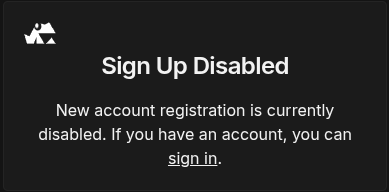
Restart your container via docker compose down && docker compose up -d, verify that signups are indeed blocked, then you should be good to go!
Write a privacy policy for your site
Now that you have a rybbit instance up and running on your website, I'd highly encourage you to write a transparent privacy policy such that your website's users are aware of rybbit's presence and can easily opt out. For an example of such a policy, you can find the one for this website here.